The 6 Best BlackBerry Phones to Buy in 2018
- Get link
- X
- Other Apps
BUY GUIDE >SMARTPHONES
The 6 Best BlackBerry Phones to Buy in 2018
Not all BlackBerry phones are created equal. Here are today's best models.
Updated April 19, 2018
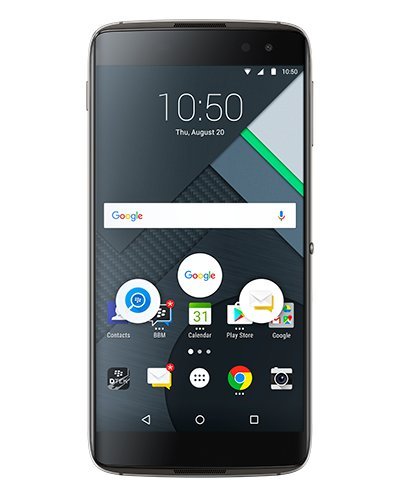
The new DTEK60 marks BlackBerry’s first outsourced device in its efforts to become a more software-focused company. Featuring a 5.5-inch qHD AMOLED display, Snapdragon 820 processor and 4GB of RAM, the DTEK60 also adds a fingerprint scanner and 21-megapixel rear camera. Specs aside, it’s the full suite of security-oriented apps that make this device one of the most secure phones on the market today. The inclusion of the BlackBerry Hub app is an exceptional addition even for Android fans who love the idea of e-mails, texts and social media all appearing in one message stream.
The device, running Android 6.0 as the operating system, feels very Android while bearing the BlackBerry logo. Gone are the days of the physical keyboard (the DTEK60 relies on the AMOLED 2560 x 1440 display as the highlight for typing emails, sending messages and doing everything else in-between). Ultimately, the DTEK60 offers the best of Android along with the best of BlackBerry. The entire Google Play app store is at your disposal alongside BlackBerry’s promise for fast updates, Enterprise support and access to encrypted BlackBerry servers.
The powerful battery lasts around 14-15 hours with moderate use. In addition to its 21-megapixel camera, the device can capture 4K video. There’s no optical image stabilization which is a bit of a drag, but it’s still one of the better cameras in the mid-range smartphone market.
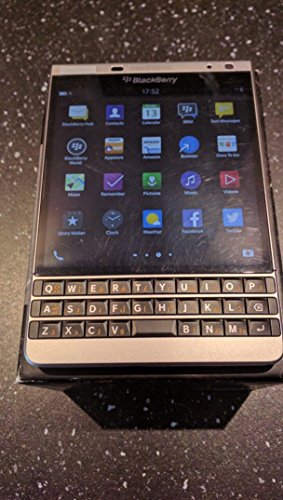
BlackBerry’s Passport device is almost impossible to mistake for any other smartphone. The square-shaped flagship features a 4.5-inch 1440 x 1400 display, 2.2GHz Qualcomm Snapdragon 801 processor, 3GB of RAM and 32GB of internal storage expandable with a microSD slot. Ideally, BlackBerry is targeting a power user with the Passport and it highlights the 1:1 square display as best suited for e-mails, spreadsheets and reports. Compared to a more traditional smartphone, the Passport allows for 60 characters in a line compared to 40 on a regular smartphone.
Beyond the unmistakable display, this BlackBerry has a three-row keyboard that is more compact than previous models (in part because punctuation marks and numbers appear as on-screen keys directly above the physical keyboard). Ultimately, the touch-enabled keyboard works quite well and is aided by predictive text with suggested words appearing on the screen. One quick swipe of the finger up and the selected word will enter itself into your current message.
Irregular form factor aside, the Passport is a well-built device with a stainless-steel trim and soft rubberized plastic on the rear of the device that’s both very comfortable and grippy. Inside, the hardware is BlackBerry OS 10.3, which remains BlackBerry’s swan song and runs some Android apps courtesy of Amazon’s app store. Still, the real win here is that messaging is fantastic. The message “Hub” is focused on bringing together all incoming communication into one centralized location or stream. Add in BlackBerry’s Assistant, their own version of Siri or Google Now, and you can dictate notes, create calendar events or send e-mails all without touching the keyboard. One fine noteworthy addition is the 13-megapixel camera that takes strong photos even if the squared display throws off the image ratio. If you can look past the form factor, BlackBerry fans will love the Passport’s features and business-friendly performance.
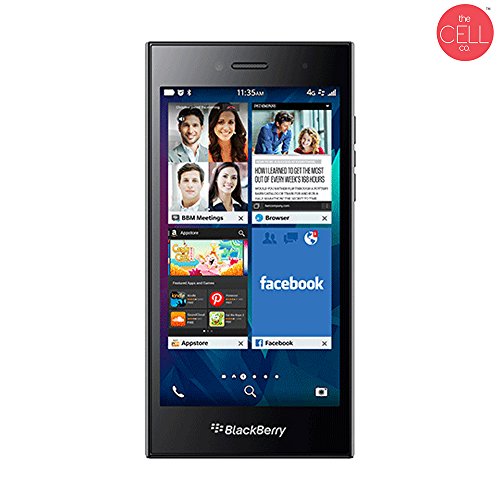
Sturdy, solid and attractive and budget-friendly are all great ways to describe BlackBerry’s Leap smartphone. Featuring a five-inch 1280 x 720 display and weighing just six ounces, the overall design isn’t anything special, but in the case of the Leap, that’s perfectly OK. Running BlackBerry’s OS 10.3.1, there’s added support for Amazon’s Android app store (though limited), plus BlackBerry World. Additionally, there’s an absolute focus on security, privacy and productivity that’s long been part of BlackBerry’s greatest assets. For convenience, BlackBerry Hub combines all your mail, texts and messages into one dedicated message corner, which is perfect for keeping an eye on all incoming communication.
The Leap is powered by a 1.5GHz Qualcomm 8960 dual-processor, 2GB of RAM and 16GB of storage (which is upgradeable to 128GB through an added microSD card). The battery itself is fantastic (it’s rated at around 17 hours of talk time and 9.5 hours of video playback). In fact, BlackBerry even claims that “heavy users” can grab 25 hours of battery life on the Leap. Beyond battery, the eight-megapixel rear camera and two-megapixel front facing camera offer the type of image quality you expect from a $200 device. There’s no “wow” factor, but the results are fine if taken in ideal conditions.
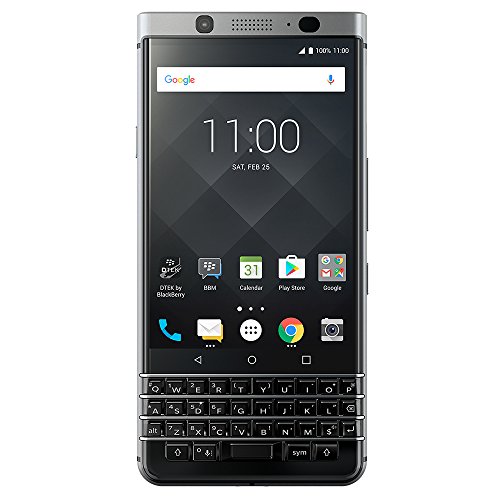
For smartphone owners who can’t decide between a touchscreen and a hardware keyboard, the BlackBerry KEYone offers the best of both worlds. The 4.5-inch 1620 x 1080 IPS LCD display adds Gorilla Glass 4 technology for greater protection against bumps or drops, while the Snapdragon 625 processor pairs with 3GB of RAM for smooth day-to-day performance. Running on Android Nougat 7.0, the KEYone offers complete access to Google’s Play Store and its million-plus app selection. An eight-megapixel front-facing camera is ideal for selfies, while the 12-megapixel rear camera adds Sony’s IMX378 sensor for superb photos and 4K video recording. For the BlackBerry faithful, the KEYone comes complete with the full suite of BlackBerry applications to maintain the full experience for the best of both BlackBerry and Android worlds. With 26 hours of battery life when fully charged, the 3505mAh battery still adds quick charge 3.0, charging the battery to 50 percent power in just 36 minutes.
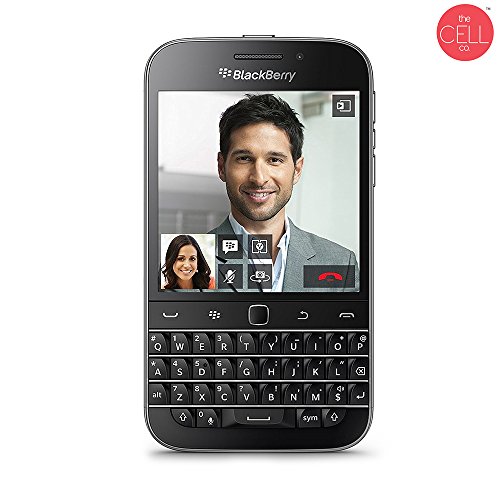
BlackBerry’s Classic is everything you know and love about the BlackBerry experience, but with a modern twist. It runs BlackBerry OS 10.3, the home-grown software from Blackberry that failed to dethrone both Android and iOS. Released at the tail end of 2014, the 6.24-ounce Classic married BlackBerry’s always-excellent QWERTY keyboard with a 3.5-inch touchscreen 720 x 720 IPS display. Unfortunately, in the land of large touchscreen devices, the 3.5-inch display feels small and its square ratio prevents it from being a truly great display.
On the rear of the device is an eight-megapixel camera with 1080p video recording, plus a two-megapixel and 720p video capture camera on the front. However, when standing on its own, BlackBerry die-hards will love the combination keyboard/touchscreen even if the square display prevents any decent multimedia viewing. Still, the integration and placement of ports and buttons along the rim of the device are well thought out, so everything is easy to reach.
The four-row QWERTY keyboard will instantly be familiar to BlackBerry owners. There’s no reason to sugarcoat the typing experience, it’s fantastic with ridges and depressions on each key, so you know where your fingers are on the keyboard. Pair the keyboard with the touchpad and selecting, copying and pasting text is an even better experience than on a dedicated touchscreen.
Ultimately, it’s software that remains the only real “weakness” of the BlackBerry Classic and, while it does support Android apps, it’s limited to what’s available on Amazon’s app store. That said, if you add in BlackBerry’s “BlackBerry Assistant," you’ve got a Siri/Google Now clone that works well enough.
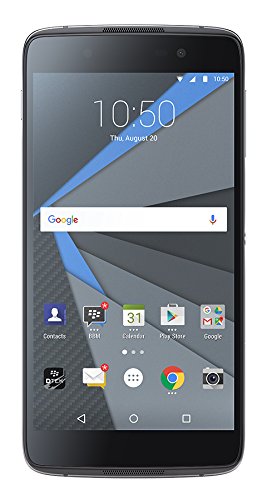
Like its older sibling, the 4.76-ounce BlackBerry DTEK50 is a budget-friendly device running Android OS and it's one of the first devices BlackBerry hasn’t manufactured on its own. Running Android 6.0.1 out of the box, BlackBerry has altered the software just enough with useful tweaks and additional apps to make it feel more secure. BlackBerry added encryption at a system level all while promising to deliver monthly security patches direct from Google. In other words, if privacy is a major concern to you, the DTEK50 might offer some peace of mind.
The device features a 5.2-inch 1920 x 1080 IPS display and a pair of stereo speakers on the rear. Design-wise, the DTEK50 isn’t the most exciting phone you’ll find (it’s fairly utilitarian as a plastic-based device with a faux-metal material running around the display). Fortunately, the rubbery back is comfortable and will have you less concerned about dropping the device.
Powered by a Snapdragon 617 octa-core processor, 3GB of RAM and 16GB of internal storage (microSD card optional), the DTEK50 feels a tad bit slower than its higher-end brother but, for the price, it’s more than good enough. Battery life stands up to the test with around 11 hours of life on a looping video. Additionally, the DTEK50 offers Quick Charge 2.0 for fast charging, but you’ll have to purchase an aftermarket charger if you want to take advantage of the quick charging. Once you purchase the aftermarket charger, the Quick Charge can take the DTEK50 from no charge to fully charged in around two hours.
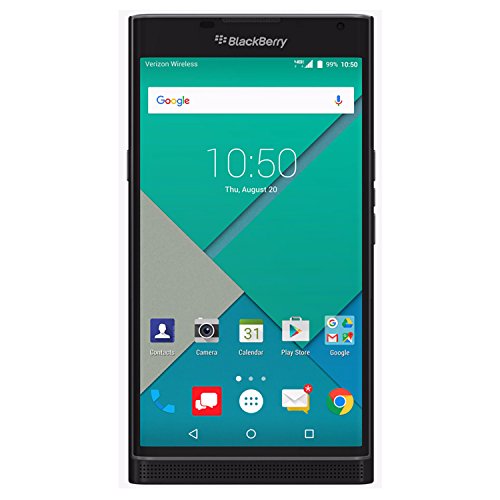
Released in 2015, BlackBerry’s Priv smartphone was a major release for the smartphone titan as its first non-BlackBerry OS device. Running Android 6.0, the Priv marked a turn away from BlackBerry’s dedicated OS and offers Google’s stock Android platform with direct access to the Play Store. Add in a 5.4-inch 2560 x 1440 qHD display, Snapdragon 808 processor, 3GB of RAM, 32GB of internal memory and an 18-megapixel rear camera you're bound to be happy with its performance.
The design is unique since it adds the best of both worlds with a gorgeous display that hides BlackBerry’s beloved QWERTY keyboard underneath. Push the display about two-thirds of the way up and the Priv completes the slider action for you. At 3.03 x 5.8 x .37 inches and 6.77 ounces, the Priv is not a small device, but its tough Gorilla Glass 4 display is matched by its “tensile weave” hardware that is neither metal nor glass, but feels great in the hand.
Additionally, the Priv offers a super powerful battery that BlackBerry claims can last around 22.5 hours of moderate use. The 18-megapixel dual-flash camera takes decent shots in daytime conditions and “good enough” photography at night. As for software, the built-in DTEK technology grades your apps' security levels by alerting you to the type of permissions an app requests or if you forget to set a password lock. Additionally, BlackBerry Hub acts as the main message center by grouping messages from almost every major communication platform into a single screen.
- Get link
- X
- Other Apps


Comments
Post a Comment